Prioritizing & Organizing Work
Learn proven frameworks for deciding what to work on first when everything feels urgent.
Video
Watch the lesson video, then complete the reading and challenge.
Presentation Slides
Review the slides below, then complete the reading and challenge.
Lesson Notes
Read through the key concepts before you try the challenge.
Real-World Scenario
Why Prioritization Is a Professional Skill
Most people in an office do not lack the ability to work hard — they lack a system for deciding where to direct that work. Without a prioritization framework, most people default to one of two dysfunctional patterns: they work on whatever landed in their inbox most recently, or they work on whatever feels most comfortable to do. Both patterns produce the same outcome — the most important work gets done last, or not at all:
- Reactive work — responding to requests in the order they arrive treats a casual Slack message as equally important as a client deliverable with a deadline. Reactivity guarantees that whoever shouts loudest controls your day.
- Comfort-seeking work — tackling easy tasks first because they feel satisfying to complete creates a dangerous illusion of productivity. A cleared inbox and a missed deadline are not a good trade.
- Prioritization frameworks give you a repeatable system — instead of making a judgment call every morning about what to work on, a framework gives you rules that produce consistent, defensible decisions about how to sequence your work.
- Prioritization communicates professional maturity — when you can explain to your manager why you worked on Task A before Task B using a logical framework, you demonstrate strategic thinking, not just task execution.
The Eisenhower Matrix
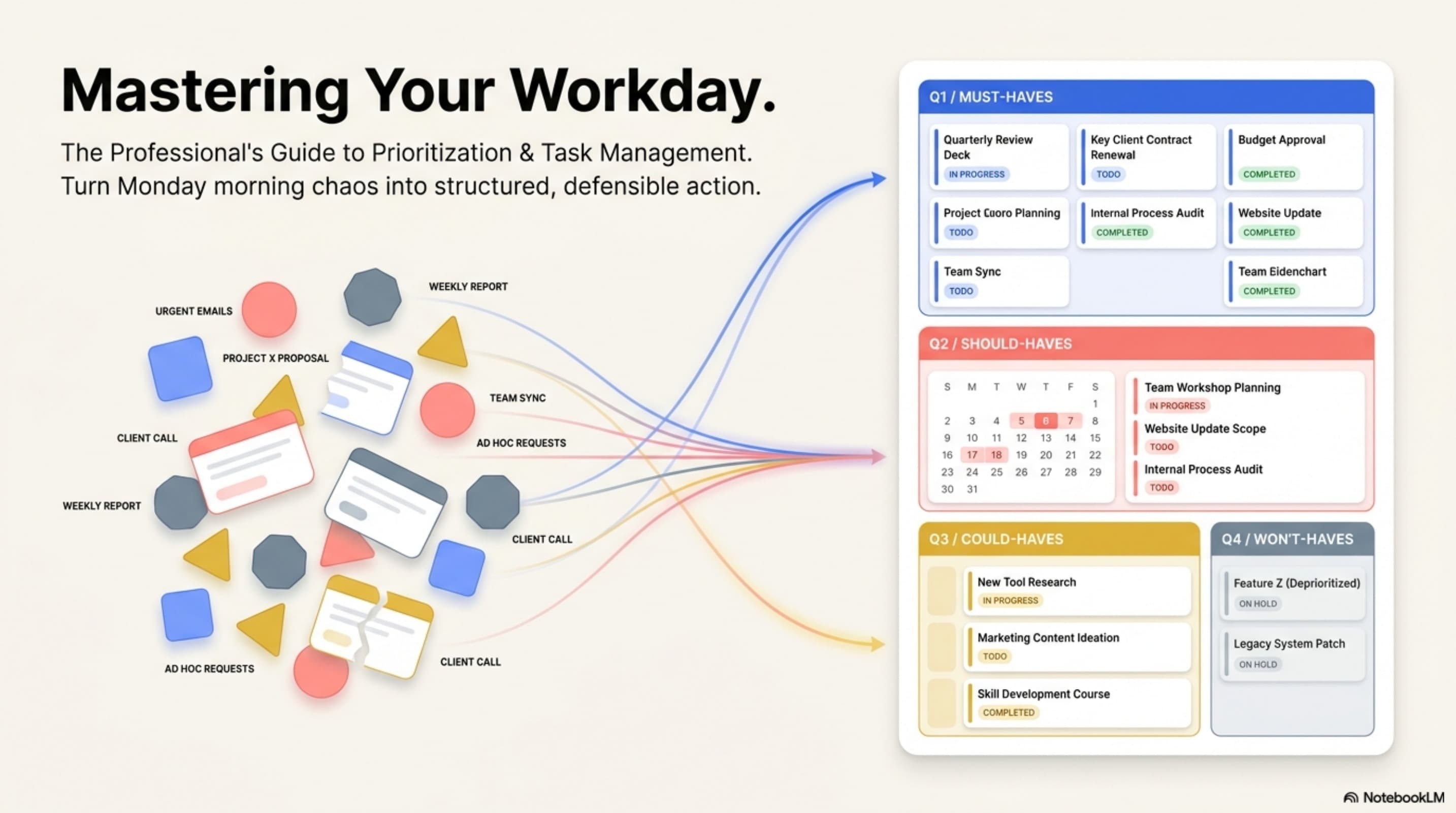
The Eisenhower Matrix is the most widely used prioritization tool in professional environments. It divides every task into one of four quadrants based on two dimensions: urgency and importance. The framework forces you to evaluate each task on both dimensions before deciding how to handle it:
- Quadrant 1 — Urgent & Important (Do Now): Tasks that have a deadline today or tomorrow and directly affect a deliverable, client, or team commitment. Example: A client report due at noon that has not been started. Handle these immediately and without interruption.
- Quadrant 2 — Important, Not Urgent (Schedule): Tasks that matter significantly for long-term outcomes but have no immediate deadline pressing on them today. Example: Reorganizing the shared drive, developing a new filing system, proactive communication with a client. Schedule specific time blocks for these or they will always get pushed aside by Q1 urgencies.
- Quadrant 3 — Urgent, Not Important (Delegate or Minimize): Tasks that feel urgent because someone is asking for them but do not directly advance any meaningful outcome. Example: Responding to a routine administrative email while a client deliverable is outstanding. Handle these quickly or delegate them — do not let them consume focus time.
- Quadrant 4 — Neither Urgent nor Important (Eliminate): Tasks that consume time without producing meaningful output. Example: Reorganizing folders that nobody uses, attending meetings with no agenda that have no bearing on your work. Eliminate these from your schedule entirely.
- The trap of Q3 — the most dangerous mistake is mistaking Q3 tasks for Q1 tasks. Something that feels urgent (a buzzing inbox, a colleague standing at your desk) is not automatically important. Ask: 'If I do not do this today, does a client relationship or a team deliverable suffer?' If no, it is Q3.
The MoSCoW Method
The MoSCoW Method is a prioritization framework used specifically for managing project deliverables when a team needs to agree on what gets built or done within a fixed scope. Unlike the Eisenhower Matrix, which is for personal daily work sequencing, MoSCoW is for aligning a team on what matters most in a project:
- Must Have — the non-negotiable requirements. If a Must Have is not delivered, the project or release cannot go out. These are the absolute minimum for the work to have value. Limit this category ruthlessly — everything cannot be a Must Have.
- Should Have — important deliverables that add significant value but the project can technically launch without them. Should Haves are completed after Must Haves if time and resources allow.
- Could Have — desirable additions that would improve the outcome but are low-stakes if dropped. These are cut first when deadlines tighten. Including them in the plan keeps the team focused on what is achievable without losing sight of what would be nice.
- Won't Have (this time) — items explicitly agreed to be out of scope for this project or sprint. Naming them in the Won't Have category prevents scope creep and manages expectations without dismissing the idea entirely.
- When to use MoSCoW vs. Eisenhower — use Eisenhower for your daily personal work queue. Use MoSCoW when your team is scoping a project, planning a sprint, or negotiating what to include in a deliverable package. They are complementary, not competing tools.
Time-Blocking: Converting Priorities Into a Schedule
Prioritization frameworks tell you what to work on. Time-blocking tells you when. Without time-blocking, even a perfectly prioritized task list gets disrupted by every incoming request, notification, and meeting that arrives throughout the day. Time-blocking protects prioritized work by assigning it a defended slot on your calendar:
- What time-blocking is — assigning each high-priority task a specific start time and end time on your calendar, just like a meeting. A block that says '9:00 AM – 11:00 AM: Q3 Client Report' is a commitment, not a suggestion.
- Why it works — a calendared task is significantly more likely to get done than an item on a list. When the time block arrives, your next action is clear: work on the report. No decision required.
- Batch similar tasks — group similar low-cognitive-load tasks (responding to emails, filing documents, updating the task board) into a single time block rather than doing them scattered throughout the day. This preserves focus for deeper work.
- Protect Q2 time — if you never block time for Q2 (Important, Not Urgent) tasks, they will never get done. Block at least one 30–60 minute Q2 slot per day to make progress on work that matters long-term but is not screaming for attention today.
- Honor the block — the most common failure of time-blocking is treating calendar blocks as optional and accepting meeting invites over them. Treat your work blocks with the same respect you give to meetings with other people — because the block is a meeting with your most important work.
Saying No Professionally & The Multitasking Myth
Two habits undermine even the best prioritization system: agreeing to every new request without evaluating its impact on existing commitments, and attempting to work on multiple tasks simultaneously. Both habits feel productive in the moment and both reduce actual output:
- Saying no professionally — when your plate is full, the professional response is not silence and not an unconditional yes. Use this script: 'I can absolutely get to that — I am currently working on [X] which is due [time]. Would you like me to prioritize this over that, or should I address it after?' This puts the decision where it belongs: with the person requesting the work.
- The key principle of professional pushback — you are not refusing the task; you are asking for explicit reprioritization. This demonstrates awareness of your workload and invites your manager into a collaborative decision about what matters most.
- The multitasking myth — research consistently shows that what people call multitasking is actually rapid task-switching, and every switch incurs a cognitive cost. Each time you shift from one task to another, your brain requires time to reload context — time that adds up to 20–40% of productive output lost across a day.
- Batching as the alternative to multitasking — instead of alternating between email and a report every 10 minutes, complete one before starting the other. Finish the report, then process all emails. Output quality and speed both increase.
- Single-task during deep work blocks — turn off notifications, close unrelated tabs, and commit to one task at a time during your scheduled focus blocks. The productivity gain from uninterrupted focus is not small — it is the difference between work that is good and work that is great.
Quick Reference: Prioritization Frameworks

Prioritization Frameworks for Office Professionals
Responsible Use
AI Assist
Knowledge Check
In the Eisenhower Matrix, tasks that are both Urgent AND Important should be:
Challenge
Apply what you've learned in this lesson.
Create a list of 10 mixed workplace tasks — some urgent, some important, some routine, some optional. Then sort all 10 tasks into a complete Eisenhower Matrix. Your submission must meet all four requirements below:
- Create exactly 10 fictional workplace tasks with clear, specific titles (no single-word tasks like 'Email' or 'Report')
- Sort all 10 tasks into the correct Eisenhower Matrix quadrant — label all 4 quadrants clearly
- Write one sentence next to each task explaining why you placed it in that quadrant
- Identify the 3 tasks you would work on first, in order, and write 1–2 sentences explaining your sequencing using the framework