What is a Modern Office?
Understand how modern workplaces operate using digital systems and tools.
Video
Watch the lesson video, then complete the reading and challenge.
Presentation Slides
Review the slides below, then complete the reading and challenge.
Lesson Notes
Read through the key concepts before you try the challenge.
Real-World Scenario
Why This Matters
Modern offices run on digital systems. If you understand how these systems work together, you can operate effectively in almost any workplace — regardless of the industry, the company size, or the specific software they use. Here is why digital fluency is the most transferable skill an office professional can develop:
- Digital systems are universal — the same core tools (email, cloud storage, documents, calendars) appear in virtually every professional environment. Master the concepts and you can adapt to any platform your employer uses.
- Employers expect immediate readiness — hiring managers assume that office assistants arrive ready to send emails, manage files, and join shared documents on day one. Digital literacy is a baseline, not a bonus.
- Speed and accuracy are inseparable from digital skill — paper-based processes are slower and more error-prone than their digital equivalents. The faster and more accurately you navigate digital tools, the more value you deliver every single day.
- Remote and hybrid work has made digital fluency non-negotiable — even in offices where everyone comes in five days a week, work is coordinated digitally. Documents are shared in the cloud, decisions are made over chat, and schedules are managed in shared calendars.
- Understanding the system lets you problem-solve — when something goes wrong (a file is missing, a meeting invite is not working, a document was overwritten), a professional who understands how digital systems work can diagnose and resolve issues without waiting for IT.
The Physical-to-Digital Translation
Every digital tool in a modern office replaces something that used to exist in the physical world. Understanding this translation helps you learn new tools faster — because the underlying concept is always familiar even when the software interface is not. Here is how the modern office maps to what came before it:
- Email replaces memos and phone tag — instead of writing a paper memo and dropping it in someone's inbox tray, you compose a digital message that arrives instantly. Instead of playing telephone tag for hours, a reply takes seconds. Email also creates an automatic written record of every communication.
- Cloud storage replaces the filing cabinet — instead of physical folders in a locked cabinet, files live in digital folders on a shared server or cloud platform. Anyone with permission can access them from anywhere, search them instantly, and collaborate on them simultaneously.
- Digital calendars replace paper planners — instead of a paper day planner that only you can see, a digital calendar is shareable, searchable, and connected to every other system in the office. Meeting invitations, reminders, and scheduling are all automated.
- Collaboration tools replace in-person-only meetings — platforms like Microsoft Teams, Google Meet, and Slack allow teams to meet, chat, share screens, and collaborate on documents without being in the same room or even the same timezone.
- Digital documents replace paper forms and reports — instead of printing, distributing, and collecting paper forms, digital documents can be filled out, reviewed, signed, and filed without a single page being printed. Version history means you never lose a draft.
Quick Reference: The Modern Office Ecosystem
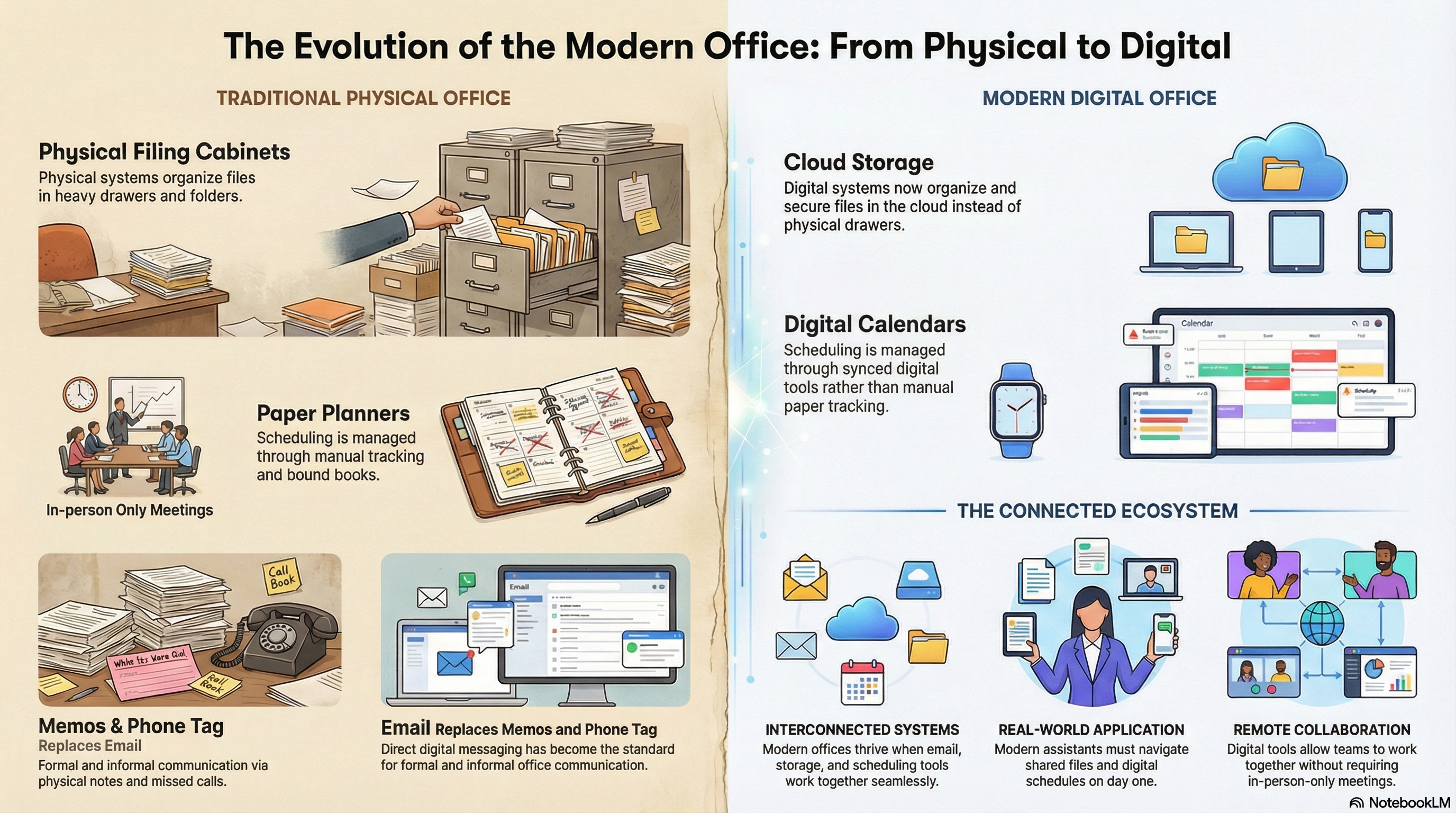
The Evolution of the Modern Office: From Physical to Digital
How Digital Offices Are Organized
A modern office is not just a collection of software applications — it is an integrated ecosystem where every tool connects to every other tool. Understanding the structure of that ecosystem is what allows you to work efficiently rather than jumping between disconnected apps:
- Communication layer — email and chat tools (Outlook, Gmail, Teams, Slack) form the communication backbone. Every task, request, and update flows through this layer first. If you cannot manage your communication layer, nothing else in the office runs smoothly.
- Storage layer — cloud platforms (Google Drive, OneDrive, SharePoint) hold every document, spreadsheet, and file the organization produces. The storage layer is shared — every team member accesses the same files, which means organization and naming conventions matter for the entire team.
- Productivity layer — document editors, spreadsheet tools, and presentation software (Google Docs, Microsoft Office, Google Sheets) are where actual work gets produced. These tools live inside the storage layer — files you create here are automatically saved to cloud storage.
- Scheduling layer — calendar tools (Google Calendar, Outlook Calendar) manage time across the organization. Meeting invitations, deadlines, and recurring commitments all live here. The scheduling layer is interconnected with the communication layer — invites are sent by email and accepted with a click.
- Coordination layer — task management and project tools (Trello, Asana, Microsoft To Do) track who is doing what and when it is due. This layer sits on top of everything else and gives teams visibility into the current state of all open work.
Responsible Use
AI Assist
Knowledge Check
What digital tool replaced the traditional paper filing cabinet in a modern office?
Challenge
Apply what you've learned in this lesson.
Reflect on a workplace you have visited, worked in, or learned about. Write a structured response that demonstrates your understanding of how digital systems operate in a real professional environment. Your response must meet all four specifications below:
- Identify at least 3 specific digital tools used in that workplace (or that would be used in a typical modern office) and name what physical tool each one replaced
- Describe one task from that workplace — or one you would be expected to do as an office assistant — and explain which digital tool would be used to complete it and why
- Explain in 2–3 sentences why understanding digital systems makes an office assistant more valuable to their employer
- Identify one potential risk of working in a digital office (such as accidental file deletion or sharing the wrong document) and describe how a professional would avoid it