Understanding OneDrive for Excel
Learn how to sign in to Excel, connect to your Microsoft account, and use OneDrive to save and access workbooks from anywhere.
By the end of this lesson you can
- Save a workbook to OneDrive and open it from another device
- Explain what AutoSave requires and why it may be greyed out
- Use version history to recover an earlier state of a workbook
- Judge what data may and may not go into a personal cloud account
Lesson Notes
Read through the key concepts before you try the challenge.
Version history is the feature worth the move
You maintain the supply budget at Lakeside Medical Associates.
You sort a 900-row sheet, but you select only one column instead of the whole range. Every name is now attached to the wrong number and you cannot tell which row was which. You saved ten minutes ago. Ctrl+Z has already been exhausted.
Your task: Understand what cloud storage gives you beyond access from anywhere — specifically, the ability to go back.
Saving to OneDrive puts the workbook on Microsoft's servers so it follows you between devices. That much matches Word. What matters more in Excel is version history: OneDrive keeps previous versions, and File > Info > Version History lets you open or restore any of them.
Excel damage is often silent. A mis-sorted column, a formula overwritten with a typed number, a deleted row — none of these announce themselves, and you may not notice for days, long past what undo can reach. Version history is the only realistic recovery, and it exists only for cloud-stored files.
Signing In to Excel
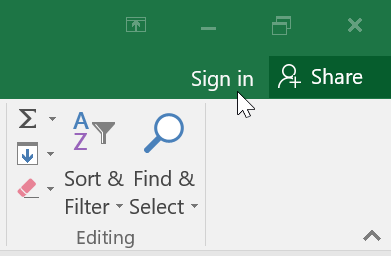
To use OneDrive features, sign in to Excel using your Microsoft account. Click the Sign In button in the upper-right corner.
Saving to OneDrive
Click File → Save As. If you are signed in, you will see OneDrive listed as a save location.
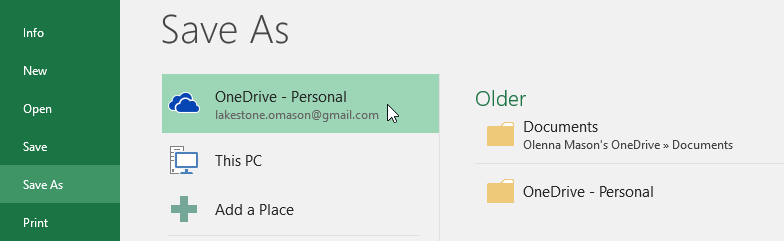
Saving to OneDrive allows you to access your files from any device and protects against data loss.
Knowledge Check
What allows you to access your Excel files from any device?
Challenge
Apply what you've learned in this lesson.
Complete the following tasks:
- Sign in to Excel with a Microsoft account.
- Save a workbook to OneDrive.
- Locate your file in OneDrive online.
- Use the Share button to generate a link.
Finished this lesson?
Progress is saved in this browser only. It is not a grade — official progress lives in Brightspace.